Play with Null Rhythm
Your own session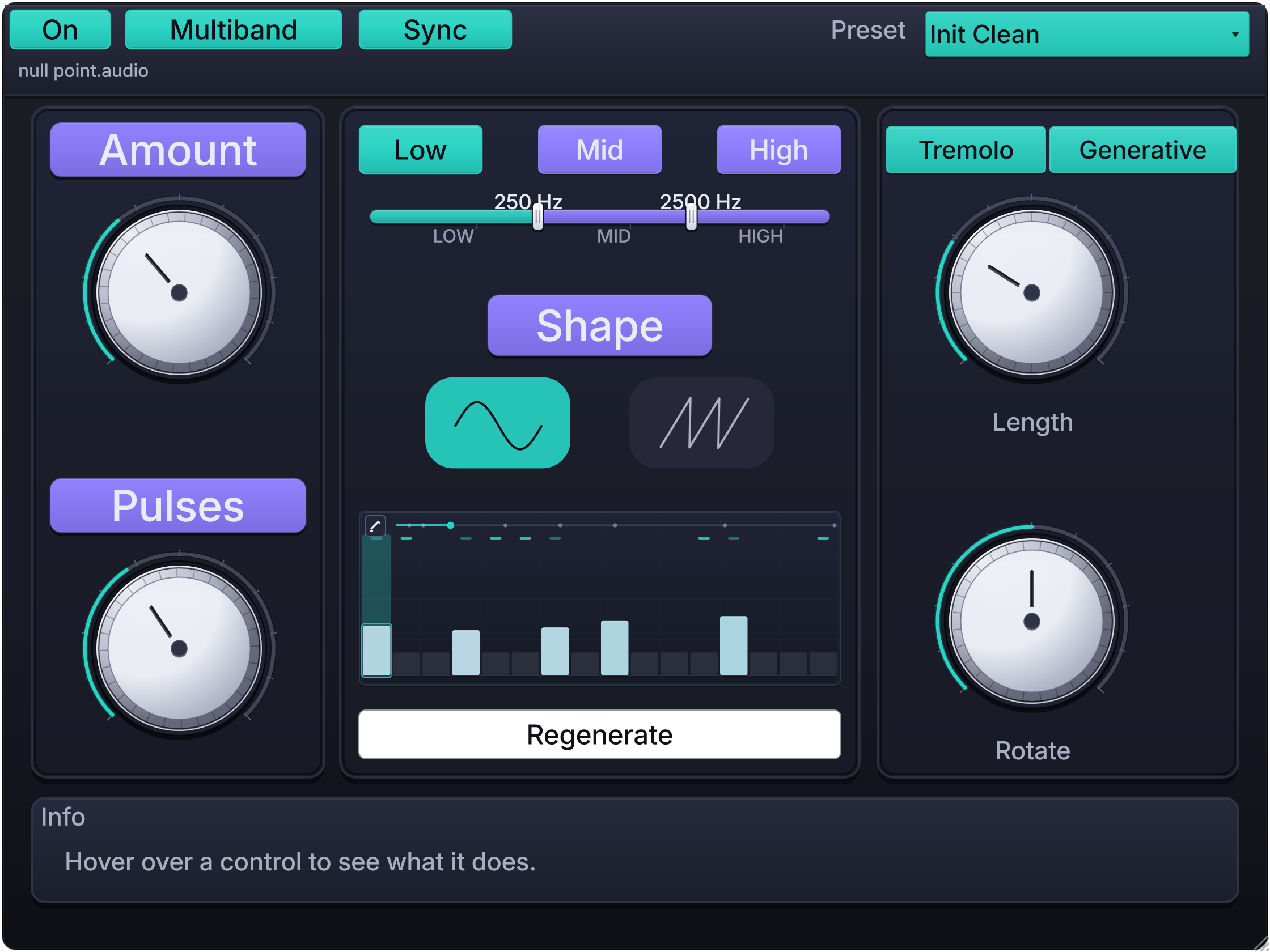
ONE WINDOW. YOUR SOUND IN MOTION.
A guitar that swells with the track. A pad that shifts beneath a vocal. A held chord that becomes a rhythmic part.
Null Rhythm brings volume modulation, pitch movement and pattern creation together in a compact, hands-on effect. Choose Tremolo or Vibrato, then shape the movement with Classic, Euclidean or Generative rhythm behavior.
Start with a subtle touch or build something more intricate across Low, Mid and High. Generate a pattern, adjust its accents, and hear the sound take on a new role in your track.
TWO MODES. THREE RHYTHM SOURCES.
TREMOLO
Give your sound a pulse. Shape its volume into gentle swells, rolling motion or pronounced rhythmic cuts. Use it to add life to a part or make that part drive the groove.
VIBRATO
Put the movement into pitch. Bring a little drift to a synth, add shimmer to a sustained note, or push into deep, restless wobble.
Choose Classic for continuous movement, or use a Euclidean or Generative pattern to bring the vibrato in and out rhythmically.
01 · CLASSIC
Familiar controls. Plenty of character.
Set Rate and Depth, then choose Sine for rounded motion or Triangle for a more angular rise and fall. Run freely from 0.1–20 Hz or switch on Sync to follow your session.
Add Chaos for wandering timing in free mode, or use Flux to reshape the modulation curve and give the movement more bite.
02 · EUCLIDEAN
Find a groove in a few turns.
Euclidean rhythms distribute your chosen number of pulses as evenly as possible across the pattern. Set Pulses, move the groove with Rotate, and use Amount to control its strength. Length takes the cycle from 1/4 bar to eight bars.
Use the pattern for rhythmic volume movement or to bring vibrato in and out. Then edit the active hits’ accents directly in the display to give the groove your own emphasis.
03 · GENERATIVE
A fresh rhythmic idea, one click away.
Generative creates patterns with varied hit placement and accents. Set the density with Pulses, choose the Length, and press Regenerate to explore another idea.
When something catches your ear, shape it in the display: add hits, remove them, or adjust their strength. The pattern repeats until you change it, giving you a groove you can build a track around.
FULL-BAND OR MULTIBAND
Move the whole sound together, or give each frequency range its own part to play.
Switch on Multiband, drag the two crossovers, and work independently across Low, Mid and High. Keep the bass moving gently, give the mids a Euclidean groove, and let the highs drift with vibrato or a Generative pattern.
Each band has its own effect mode, rhythm source and modulation settings. Low-band gain protection helps keep the bottom end present during tremolo and rhythmic gating.
CHAOS & FLUX
Dial in the character of the movement.
Chaos introduces timing variation to free-running Classic tremolo and vibrato. Flux bends the modulation curve for a more pronounced pulse or pitch wobble.
Keep them low for a subtle change in feel, or push them for more restless motion. With Sync enabled, timing stays tied to the host beat.
VARIATION
Build interlocking rhythms with one control.
In Multiband, Variation offsets pulse count, rotation and modulation strength across rhythmic bands. It simplifies and softens the low-band pattern while adding activity higher up.
Turn it while listening to find the relationship that fits your track. When Generative is selected, Regenerate takes its place in the interface, ready to create a fresh pattern for that band.
SYNC THAT FOLLOWS YOUR SESSION
Keep the movement connected to the music.
Sync follows your DAW’s tempo, time signature and playback position across both effect modes and all rhythm sources. Loops and transport changes are accounted for, and modulation timing holds when playback stops.
Classic Rate stays continuous with Sync on. Move through familiar divisions from two bars to 1/32, or fine-tune the values between them. Rhythm Length follows your session’s bar length, including meters such as 3/4 and 7/8.
SEE AND SHAPE THE MOVEMENT
The central display makes the current movement easy to follow.
Classic shows the modulation wave. Euclidean and Generative show the rhythm, accents and pattern length, with a playback indicator showing where you are in the cycle.
Activate the pencil tool to edit Euclidean hit accents or draw and reshape Generative steps. Switch bands to work on another part of the sound, right in the same window.
10 FACTORY PRESETS
Ten starting points, including Init Clean, take you from gentle motion to layered multiband grooves:
- Init Clean
- Subtle Pad Motion
- Warm Guitar Tremolo
- Soft High Shimmer
- Bass Safe Movement
- Three Pulse Flow
- Five Hit Syncopation
- Polyrhythm Wide
- Bass Protected Groove
- Null Point Rhythm
Load one, hear what it does to your track, then make it yours with the controls on screen.
WHY IT’S DIFFERENT
Null Rhythm lets different parts of one sound move in different ways.
Combine volume and pitch movement across three bands. Use evenly distributed Euclidean pulses, generate a new pattern, or shape the accents yourself. A steady low end, syncopated mids and shifting highs can become one playable effect.
Smoothed mode changes, bypass and crossover adjustments keep transitions controlled as you automate. From a small lift in a verse to a more animated chorus, the movement stays within reach.
| Feature | Specification |
|---|---|
| Version | 1.0.0 |
| Type | Tremolo and vibrato effect with Euclidean and Generative rhythm modulation |
| Effect modes | Tremolo · Vibrato |
| Rhythm sources | Classic · Euclidean · Generative, available with either effect mode |
| Processing | Full-band or three-band multiband |
| Multiband controls | Low, Mid and High selection; adjustable Low/Mid and Mid/High crossovers |
| Per-band settings | Effect mode, rhythm source, rate, depth, waveform and rhythm settings |
| Free-running Classic rate | 0.1–20 Hz for tremolo and vibrato |
| Synced Classic rate | Continuous, with reference divisions at 2 bars · 1 bar · 1/2 · 1/4 · 1/8 · 1/16 · 1/32 |
| Host sync | Tempo, time signature and playback-position following; loop handling; timing holds when transport stops |
| Waveforms | Sine · Triangle |
| Chaos | Global control for timing variation in free-running Classic tremolo and vibrato |
| Flux | Global control for reshaping the Classic modulation curve |
| Rhythm controls | Pulses · Rotate · Amount · Length |
| Rhythm lengths | 1/4 bar · 1/2 bar · 1 bar · 2 bars · 3 bars · 4 bars · 6 bars · 8 bars |
| Rhythm timing with Sync off | Internal 120 BPM, 4/4 timing |
| Generative patterns | Varied hit placement and accents; Regenerate creates a new pattern for the selected target |
| Pattern editing | Adjust active Euclidean hit accents; add, remove and adjust Generative steps in the display |
| Variation | Global macro that offsets multiband rhythm settings; Regenerate is shown when Generative is selected |
| Bass protection | Low-band gain floor for multiband volume modulation |
| Presets | 10 factory presets, including Init Clean |
| Audio layouts | Mono · Stereo |
| Windows format | VST3 |
| macOS formats | VST3 · AU |
| Platforms | macOS universal: Apple Silicon and Intel; Windows 10 / 11: 64-bit |
| Licence | One-time purchase · Lifetime access to future Null Rhythm updates · Works offline after installation |
| Price | €24.99 — one-time |
| Status | Available now |
Before you buy
Can I try it first?
Yes. Download the free version and hear Null Rhythm on your own tracks before you decide. The free version has fewer features than the paid version.
Is it a subscription?
No. Null Rhythm costs €24.99 as a one-time purchase, with lifetime access to future Null Rhythm updates. No recurring payments.
Does it need an internet connection?
Once installed, Null Rhythm works offline. There is no licence-server connection or recurring activation check.
Which DAWs does it support?
Use a compatible 64-bit DAW with VST3 support on Windows. On macOS, choose VST3 or AU to match your DAW. The free version lets you check Null Rhythm in your own setup.
Can every band do its own thing?
Yes. In Multiband, Low, Mid and High each have their own Tremolo or Vibrato selection, Classic, Euclidean or Generative rhythm source, and modulation settings. Sync, Chaos, Flux and Variation are shared controls.
Can I edit a generated rhythm?
Yes. Enable the pencil tool in the display to add or remove Generative hits and adjust their accents. Press Regenerate whenever you want a new starting point. Euclidean patterns also let you adjust the accents of active hits.